MANUAL / 0.5.11
KRIECHSTROM for VIBE FM: the dark industrial and EBM groovebox of the M-VAVE FM-1 as a native Vibe. Four tracks, a step sequencer, distorted synths, drums, a master that wears the mix out, pedalboards, a sampler and an audio input.
The sounds and the effects are the FM-1 firmware's own; the FM-1 manual describes each engine and effect in depth. This manual covers how to play it on the VIBE, in the Playground and in the plugin. The cheat sheet has every control on one page; on the device, HOME shows the controls of the page you are on.
Getting it running
- In the browser: open the Playground, press Power on, choose
Load your own .wasm… in the list at the top and pick
kriechstrom.wasmfrom the latest release (or drop the file onto the device). Sound starts after the first click. - In a DAW: open VIBE FM VST and drop
kriechstrom.ziponto its window. - No ENTER key on the panel? The Playground's and the plugin's panels have none: a click on the DATA knob (without turning it) is ENTER.
- No MENU key? The plugin's Rack view has none: SHIFT + HOME opens MENU, or click MENU at the top of the display. View: Full shows every key, the pads and the keyboard.
- The ↵ key left of the display is RETURN: back to the page before, step by step.
The display
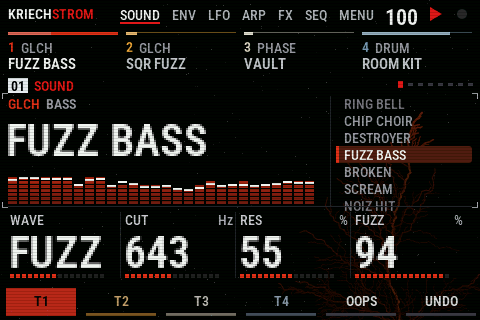
- Top line: the families SOUND ENV LFO ARP FX SEQ and MENU (the one open is underlined), the tempo, play and record. A click on a family opens it; a click on the logo opens HOME.
- The four tracks: number, engine and sound, a level line. The selected one is white; click one to select it (or F1-F4).
- The page: its number on a white plate, its name, and dots on the right for the family's pages (< >, or the family's key again, step through them; a click on a dot jumps).
- The picture: what the page is about, live.
- DATA is the page's own knob, so the hand can stay on it: on SOUND the sounds, on a list the list, on SEQ the step, on a pedalboard the pedal, on MIXER the selected track's level; on every other page the card marked DATA (the one last turned), and a click on DATA moves it to the next card.
- The four cards: the values encoders 1-4 turn. In the plugin and the browser a drag up or down in a card's column turns that encoder.
- The soft keys: F1-F4 select a track, F5 is the page's action (its name is shown), F6 is UNDO.
First five minutes
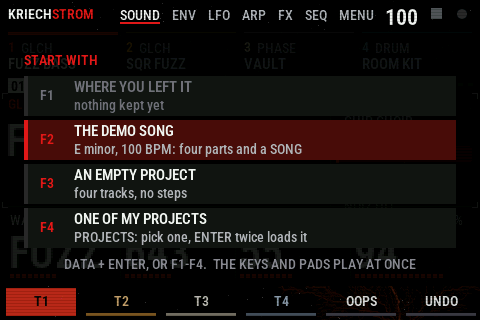
- At the start pick F2 THE DEMO SONG (F1 goes on where you left it, F3 is an empty project, F4 one of your projects).
- PLAY: four tracks play. The pads' top row mutes them.
- Turn B: DAMAGE wears the whole mix out (SHIFT + B: WALL). The display wears with it.
- Press a pad of the second row: DICE writes that track a new part.
- Hold a pad of the third row: 1/16 repeat, tape stop, freeze, gate.
- SEQ four times to SONG, F5: the whole demo song, about a minute and a half.
- HOME on any page: what each control does there, and how its effect goes on and off.
Sounds
- SOUND shows the selected track's sound big and its neighbours in a list. DATA steps through the sounds (a click on one in the list loads it), SHIFT + DATA through the engines.
- SOUND again: the engine's own values (EDIT 1, EDIT 2; FILTER on ANALOG, the lanes on DRUM, the slices on SLICE, the operators on FM6), then VOICE 1-3, SAMPLER and MY SOUNDS.
- F5 OOPS changes two or three values at random; F6 takes it back.
- MY SOUNDS: 32 slots of your own. ENC 1 or DATA picks, F5 saves the track's sound there (SHIFT: erase), ENTER loads.
- A is the selected track's level.
The sequencer
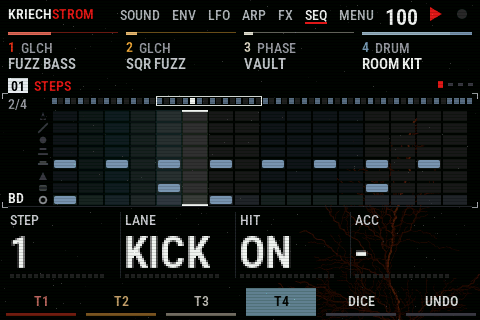
- STEPS: a piano roll, or on a drum track a grid of eight lanes; the whole pattern above it. The pads are the 16 steps shown (lit as they play); DATA moves the cursor, ENTER switches the step, a click on the grid too. ENC 1-4: STEP, NOTE (on drums the LANE), TIME, FLAG (accent, slide).
- DETAIL: the cursor step's CHANCE (or a condition), RATCH, NUDGE and VEL. DATA moves the step.
- AUTOMATION: the locks and the recorded movements; ENC 1 or DATA picks a row, ENTER acts on it.
- SONG: sections in order, each a part (A-D) per track and its repeats; ENC 1 or DATA picks a section; F5 plays the song.
- REC arms the selected track: playing, the keys record live.
- A controller with an 8 x 8 grid (a Launchpad) shows all 64 steps at once on SEQ.
DICE and MOOD
DICE writes a track a new part in the current MOOD: pads 5-8 (one per track), or F5 on SEQ. SHIFT + F5 on SEQ steps through the eight moods (MACHINE to HUSH); the name shows at the bottom. The mood is one for all tracks.
The pads
| Pads | As they are | With SHIFT |
|---|---|---|
| 1-4 | mute T1-T4 | solo (again: all back) |
| 5-8 | DICE on T1-T4 | OOPS on T1-T4 |
| 9-12 | hold: 1/16 repeat, tape stop, freeze, gate | hold: roll, reverb throw, echo throw, filter |
| 13-16 | KICK SNARE CLAP HAT, with velocity | the kit's other four lanes |
While SHIFT is on, the display names every pad. On SEQ the pads are the steps. On MASTER pads 5-8 switch DAMAGE, WALL, SPLICE and HAUNT on and off (lit while on); on a pedalboard pads 5-7 bypass pedals 1-3 and pad 8 all of them.
Effects
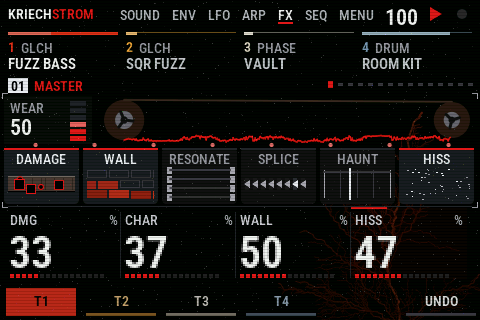
- MASTER: the whole mix's wear. ENC 1-4: DAMAGE (tape or digital dropouts), CHAR (tape to digital), WALL (a wall of sound), HISS. The tiles below show each effect of the chain as a machine of its own; a click on a tile opens that effect's page. WEAR on the left: how far the mix is worn.
- SENDS: the selected track's DIST and its sends to the chorus, the delay and the reverb.
- SLICER, DELAY, REVERB, CHORUS: the track's slicer and the effects all tracks share.
- DAMAGE, RESONATE, SPLICE, HAUNT: the master's effects, a page each. RESONATE: four strings in a chord ringing with the mix. SPLICE: the tape cut and glued back wrong. HAUNT: a reversed swell into the snare, or the tape braking at the bar's end.
- On and off: HOME says how on each page (an amount at 0 is off). An effect that is off says so on its picture, and what turns it on.
Pedalboards
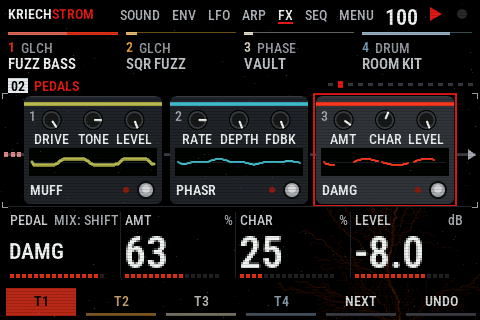
- Each track has three pedals in a row (the first is the project's INSERT, as on the FM-1), the input has three, the whole mix two (INPUT PEDALS and MASTER PEDALS, at the end of FX).
- The pedal the knobs turn is framed red: pick it with DATA, F5 or a click. ENC 1 its type (one of thirteen: SOFT HARD FOLD FUZZ CRUSH PHASR FLANG CHOR MUFF BASS SMASH DAMG INFCT), SHIFT + ENC 1 its mix, ENC 2-4 its knobs.
- The window of each pedal shows what it does to a wave; the LED and the signal on the cables show how hard.
The sampler
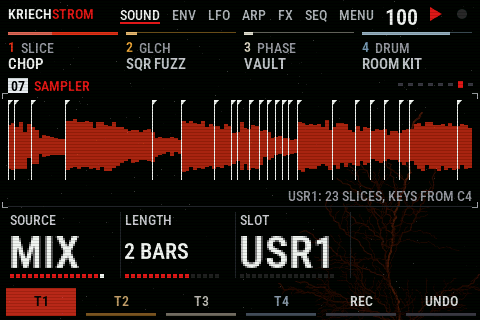
SOUND > SAMPLER. ENC 1 the source (the input or the whole mix), ENC 2 the length (1, 2 or 4 bars), ENC 3 the slot (USR1-3). F5 REC records from the start of the next bar. Then give a track the SLICE engine with that slot as its source: the recording is cut where its hits are, played from the keys and the steps. The recordings are kept and saved with your projects.
The audio input
FX > INPUT: a guitar, a voice or a drum machine into the mix, through the whole master. LEVEL, DRIVE; GATE: a track whose notes open the input (the drums chop the guitar); FEEDS: the input stands in for a track as INFECT's source (a voice talks through a pad with VOX). INPUT SENDS: its pan and sends. F5: LINE, MIC or HI-Z. The browser asks for the microphone the first time.
Projects
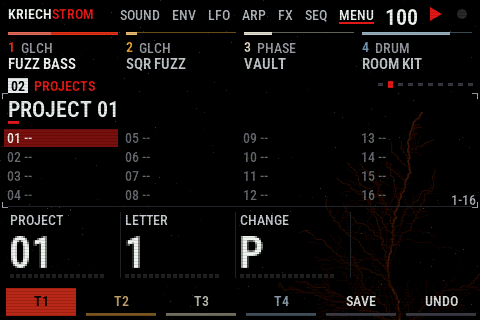
- MENU opens on its pages as tiles. SHIFT + MENU (in Rack: SHIFT + HOME, then the first tile) goes to PROJECTS.
- PROJECTS keeps 32 whole projects: the music, parts A-D, every pedalboard and the sampler's recordings. ENC 1 or DATA picks a place; ENC 2 and 3 spell its name; F5 saves; ENTER twice loads (SHIFT: deletes).
- SHIFT + F5 exports the project as a
.kxpfile intoVIBE FM/kriechstrom/on the host's writing place (the VIBE's card, the plugin's folder, a folder the browser was given). FILES lists them; ENTER imports one. In the plugin, drop a.kxponto the window. - PARTS A-D are the four parts of one song that SONG chains (the FM-1's project slots).
- The music as it is now is kept by itself and is there at the next start (F1 on the start screen).
In a DAW: outputs and parameters
- MENU > OUTPUTS: give the plugin more outputs in the DAW and each track goes out on its own pair (T1 on OUT 3/4 .. T4 on 9/10), the shared effects on 11/12, the input on 13/14; the master stays on 1/2. The parts come before the master's wear, so record OUT 1/2 as the finished sound and the parts to add to it; for a clean multitrack, turn the master's effects off first.
- The mixer, the sounds, the envelopes, the sends and the master's effects are parameters the DAW can automate; the DAW's transport and tempo lead. Under VIBE FM Link the controller shows the page and the four knobs.
MIDI, CV, clock, foot pedal
- MIDI & CV: every track's notes on its own channel, the clock (24 PPQ, START and STOP), one track on CV and gate.
- FOOT PEDAL: the expression pedal turns DAMAGE, WALL or the level (ENC 1); the switch plays, DICEs, stops the tape or freezes (ENC 2). Without a pedal, a click on the page sets the expression, a click on the switch presses it.
- CLOCK: BPM, swing, the clock's source.
The display and the stage
- The display wears with the sound: the figure behind the pages grows with DAMAGE and WALL; on each drum hit a discharge grows behind the page; DAMAGE tears the picture, SPLICE cuts bands out, HISS adds grain. MENU > DISPLAY: SCREEN WEAR OFF, LOW (the default) or FULL, and LIGHTNING on or off.
- The stage (the plugin and the Playground): a second picture with all four patterns, the discharge over the master's scope and the master's chain on knobs. Steps and knobs work with the mouse.
Credits and source
KRIECHSTROM for VIBE FM is free software (GPL-3.0). It runs the code of KRIECHSTROM for the FM-1, built on Felucca by Leo Kuroshita (Hügelton Instruments), with parts of Glitchbox by erikdevos. Built with the VIBE FM SDK. The source, the credits and the licences are on GitHub.