MANUAL / 0.2
Firmware for the M-VAVE FM-1 for dark industrial and EBM: four tracks, a sequencer with locks, drums, distortion and live effects.
Cheat sheet
Everything that is not written on the panel, on one screen.
| Do | What happens |
|---|---|
| Any button | tap = its pages, again = next page; hold = its layer; double-tap = the layer stays open |
| ALGORITHM / PRESETS / SELECT | track / sound / tempo, on every page |
| SAVE hold | undo (hold again: redo) |
| HOME hold | the menu |
| Stop, SAVE, K1, OCT+, OCT+ | save the sound to a user slot |
| REC | arm the track: stopped on STEP the keys write steps, playing they record live |
| STEP: hold a step + knob | a lock: that value on that step only |
| STEP: hold a step + EDIT | clear the step's locks |
| Drum grid | black keys pick the lane, white keys are steps 1-16 |
| SEQ hold + F5 / G5 | DICE (a new part) / MOOD (the next mood) |
| SEQ hold + K1-K4 | LEN, DIV, SWING, GATE |
| SEQ hold + OCT− | the track back as before the layer |
| EDIT hold + white key | the engine |
| EDIT hold + E5 / F5 / G5 | INIT / CLEAN / OOPS (happy accident) |
| FX hold + white key | an effect on, tap again: off |
| FX hold + OCT− | every effect off |
| FX hold + black key | mute a track |
| FX hold + SELECT | WALL, quiet to wall |
| FX hold, key held + PRESETS | put another effect on that key (EDIT: its default) |
| GLO hold | F#3-C#4 mute, F3-B3 solo, C4 unmute all, D4 MIDI LEARN, E4 FILL, F4 TAP, K1-K4 levels |
| GLO hold + SELECT | tempo (when SELECT does something else) |
| SCL hold + key | the root note |
| LFO hold + knob | MOMENTARY: let go, the value jumps back (OCT+ keeps it) |
| FX > DAMAGE, K1-K4 | DMG (wear), CHAR (tape to digital), WALL (quiet to wall), HISS (tape noise) |
| MIDI CC85 / CC86 | WALL / DAMAGE |
- Cheat sheet
- Install
- The panel
- First five minutes
- Changing sounds
- The GLCH engine
- HAPPY ACCIDENT (OOPS)
- The sequencer
- Drums
- SEQ TOOLS
- DICE and moods
- Live: the FX layer
- Mutes, solos, fills, songs
- Effects: what is what
- DAMAGE and WALL
- Saving and undo
- MIDI and USB audio
- Menu and screen
- All sounds
- Credits and source
Install
- Connect the FM-1 by USB. Use Chrome or Edge on a computer (the installer needs Web MIDI).
- Open the installer, press Connect, then Install. Do not unplug until it says done.
- The FM-1 restarts with the KRIECHSTROM splash. On the computer it shows up as KRIECHSTROM (MIDI and audio).
Tested on the FM-1 with the new flash chip. Your Felucca projects load as they are. To go back to the official firmware, the installer has a Restore option.
The panel
Every button has two jobs: tap it for its pages (tap again for the next page), hold it for its layer, a map of what the keys do right now. Double-tap a layer button to keep the layer open without holding. On pages and dialogs OCT+ does it and OCT− goes back.
| Button | Tap | Hold |
|---|---|---|
| HOME | HOME, MIXER, CLOCK | the menu |
| SEQ | STEP (piano roll or drum grid), DETAIL, AUTOMATION | SEQ TOOLS (with DICE) |
| GLO | SONG | mutes, solos, FILL, TAP tempo, MIDI LEARN, levels |
| SAVE | USER, PRESETS, PHRASES, PROJECT, TOOLS | UNDO |
| LFO | LFO, LFO 2, LFO DEST, MOD | with a knob: MOMENTARY (springs back) |
| EDIT | EDIT 1, EDIT 2, VOICE pages (engine pages too) | engines on the keys, INIT, CLEAN, OOPS |
| FX | SENDS, SLICER, PEDAL, PEDAL MIX, DELAY, REVERB, CHORUS, DAMAGE | the live effects on the keys |
| SCL | SCL, CHORD | any key sets the root |
| ENV, ARP | their pages | |
| REC | arms the track for recording | CLEAR, CLICK, COUNT-IN, click level |
| PLAY | start / stop |
| Knob | Does |
|---|---|
| ALGORITHM | picks the track, 1 to 4, on every page |
| PRESETS | changes the track's sound on every page that is not a list |
| SELECT | tempo |
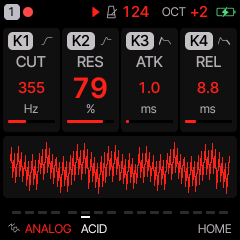
| K1 K2 K3 K4 | the four cards at the top of the screen |
| MASTER | volume |
The footer always says what the buttons do on the screen you are on. With HELP on (the default) a short hint shows for two seconds whenever a page or layer opens.
First five minutes
- Press PLAY. A beat and a bass start.
- Turn ALGORITHM to pick a track. The number in the top left corner is the track.
- Turn PRESETS: the sound of that track changes while it plays. The pattern stays.
- Play the keys: they play the selected track.
- Hold SEQ and press F5 (DICE): the track gets a new pattern in the current mood. Press again for another.
- Hold FX and tap a white key: repeat, filter, tape stop and more go on. Tap it again: off. OCT− with FX held: all off.
- Didn't like it? Hold SAVE: undo.
Changing sounds
PRESETS
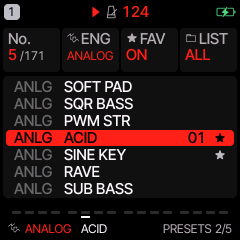
Turn PRESETS anywhere. Tap SAVE twice for the PRESETS list: K2 picks the engine, K3 marks a favourite, K4 shows one category only (BASS, LEAD, PAD, PLUCK, KEYS, DRUM, FX).
Engines
Hold EDIT: the white keys are the engines. Press one and the track switches to it with its first sound.
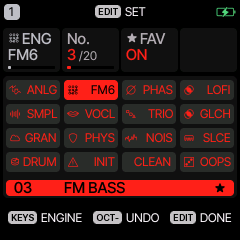
| Engine | What it is good for |
|---|---|
| ANALOG | subtractive: basses, sequences, leads |
| FM6 | six-operator FM: electric pianos, bells, metallic tones |
| PHASE | phase distortion: pads and leads |
| LOFI | wavetable chip sounds |
| SAMPLE | the piano and other samples |
| VOICE | formants, choirs, whispers |
| TRIO | three oscillators, fat basses |
| GLCH | from Glitchbox: clipping, wavefolding, a resonant filter, bit crushing, micro-stutter |
| GRAIN | granular clouds |
| PHYS | plucked and struck strings, metal |
| NOISE | noise sources: static, wind, alarms, rumble |
| SLICE | a sliced break |
| DRUM | the drum machine, eight lanes |
Editing
Tap EDIT: EDIT 1 and EDIT 2 are the engine's eight parameters on K1-K4. Tap again for VOICE (poly / mono, glide), and the engine's own pages. ENV is the envelope, LFO the LFOs and the mod matrix.
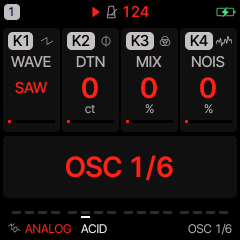
Hold LFO and turn a knob for a MOMENTARY move: let go of LFO and the value jumps back.
The GLCH engine
GLCH is an oscillator (15 waves: SAW, SQR, DUAL, RING, NOIS, FAT, FM, FMX, FUZZ, REES, 808, GRIT, GROW, SYNC, SUPR) into a resonant filter, a clipper and folder, a bit crusher and a micro-stutter that chops the note into pieces. Most of its 48 sounds come with a PEDAL already set (MUFF, BASS, SMASH, FUZZ, FOLD, CRUSH).
| Knob | EDIT 1 | EDIT 2 |
|---|---|---|
| K1 | WAVE | CRSH: bit crush |
| K2 | CUT: filter cutoff | GLCH: how often the stutter cuts in |
| K3 | RES: resonance, up to self-oscillation | SIZE: the stutter's slice length |
| K4 | DRV: drive into the clipper | PJMP: pitch jumps between slices |
HAPPY ACCIDENT (OOPS)
Hold EDIT and press G5. Two or three of the sound's parameters jump somewhere else, sometimes an
effect send too. The screen says what moved, for example OOPS: CUT RES DLY. Press again for more. Kept
something good? Save it (SAVE > USER). Went too far? Hold SAVE: the sound comes back as it was before the
first OOPS.
It never touches the level, the pattern, the engine or the kit, so the track keeps playing as part of the song.
The sequencer
Each track has its own pattern, up to 64 steps. Tap SEQ for STEP. On a synth track STEP is a piano roll.
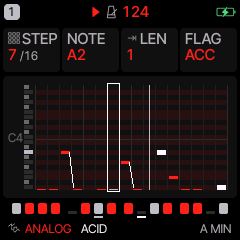
Writing notes: step by step
- Stop. Go to SEQ > STEP. Press REC to arm the track.
- Play a key (or a chord: hold the keys together). The note goes to the step under the cursor and the cursor moves on.
- K1 moves the cursor (STEP), K2 changes the note, K3 the length (hold over several steps = a tie), K4 the flags: ACCENT and SLIDE.
- Press REC again to disarm.
Writing notes: live
Press PLAY, then REC, and play. The loop records what you play, overdubbing every pass. Your timing is kept as a NUDGE; QUANTIZE on the SCL page decides if it is played as you played it or on the grid. Hold REC for the click and a count-in.
Locks: one step, its own value
On STEP hold a step (its key) and turn any knob: that value is set for that step only. A dot marks steps with locks. Hold the step and press EDIT to clear its locks.
DETAIL and AUTOMATION
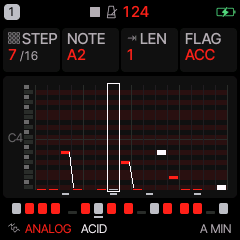
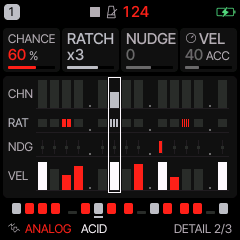
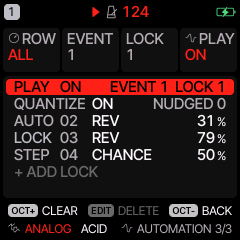
Tap SEQ again for DETAIL: the cursor step's CHANCE (also conditions like 1:2, 3:4 and FILL), RATCHET (2-4 hits in a step), NUDGE and VELOCITY. PRESETS moves the cursor here. Once more for AUTOMATION: a list of everything that happens on the steps, locks and recorded knob moves, which you can edit or delete one by one.
Length, speed, swing
Hold SEQ: K1 LEN (1-64 steps), K2 DIV (4 bars to 1/32), K3 SWING, K4 GATE. Odd lengths on different tracks drift against each other: 16 on the drums, 14 on the bass, 7 on a line.
Drums
On a DRUM track STEP is a grid: white keys are steps 1-16, black keys pick the lane (kick, snare, clap, closed hat, open hat, tom, rim, bell). Pick a lane with a black key, then press white keys to set or clear its hits. K1 moves along the steps (pages of 16), K2 picks the lane, K3 the hit, K4 the accent.
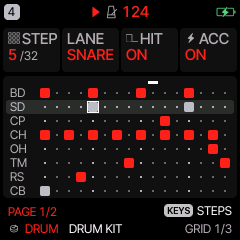
Locks work here too: hold a step key and turn a knob. Hold EDIT on a drum track: the black keys mute lanes. The kits: DRUM KIT, DEEP KIT, TIGHT KIT, PERC KIT, DESTROY (from Glitchbox, with the SMASH pedal), and the KRIECHSTROM kits FACTORY, STOMP, GATED, BUNKER, TOMB, RIOT, METAL SHOP, DRY BONES. Change the kit with PRESETS like any sound.
SEQ TOOLS
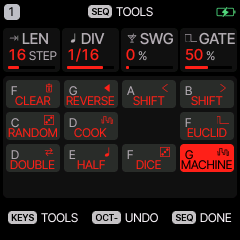
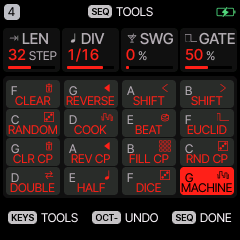
Hold SEQ on any page. The white keys become tools for the selected track. Each tool is one undo (SAVE held), and OCT− puts the track back as it was when you opened the layer.
| Key | Tool |
|---|---|
| F3 | CLEAR the pattern |
| G3 | REVERSE |
| A3, B3 | SHIFT one step left / right |
| C4 | RANDOM: a new beat, or new notes in the scale on the same rhythm |
| D4 | COOK: changes the pattern a little each press |
| E4 | BEAT (drums): a new beat |
| F4 | EUCLID: hits spread evenly (K1 hits, K2 steps, K3 rotate; OCT+ applies) |
| G4 A4 B4 C5 | drums: CLEAR, REVERSE, FILL, RANDOM of the selected lane |
| D5 | DOUBLE: the pattern twice as long, copied |
| E5 | HALF: only its first half |
| F5 | DICE: a whole new part in the current mood |
| G5 | MOOD: the next mood (its name is on the key's cell) |
DICE and moods
DICE writes a part that fits the track: on a drum track a beat, on track 1 a bass line, on track 2 stabs and chords, on tracks 3 and 4 a high line, riser or drone. Notes are in the track's scale and root (hold SCL and press a key to change the root). Every press is different. MOOD picks what kind of part:
| Mood | Feel |
|---|---|
| MACHINE | straight sixteenths on the root, kick on every beat, hats on the offbeat |
| GRIND | slower: the bass slides to the flat second, low held chords |
| MARCH 7/8 | 14 steps, accented notes on every other step |
| GLITCH | random hits and notes, gaps in the beat |
| SPIRAL | descending lines, tom rolls |
| GHOST | sparse: a held root, an arpeggio, a single bell |
| SURGE | dense: offbeat bass, open hats, claps, a riser |
| HUSH | quiet: eighth notes in the bass, a held chord, a drone |
The mood is not saved: the FM-1 starts with MACHINE.
Live: the FX layer
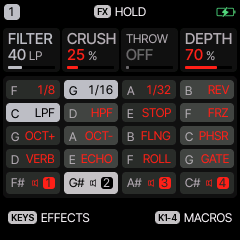
Hold FX and tap a white key: its effect goes on for the whole mix and its cell lights. Tap it again: off. OCT− with FX held turns every effect off. Black keys mute tracks. K1-K4 are macros: FILTER, CRUSH, THROW, DEPTH. Turn SELECT with FX held for WALL (see DAMAGE). If you would rather have an effect only while a key is held, set MENU > CONTROL > FX LATCH to OFF.
| Key | Effect | Key | Effect |
|---|---|---|---|
| F3 | repeat 1/8 | G4 | octave up (shimmer) |
| G3 | repeat 1/16 | A4 | octave down |
| A3 | repeat 1/32 | B4 | FLANGER |
| B3 | reverse | C5 | PHASER |
| C4 | low-pass sweep | D5 | REV THROW: every reverb send full |
| D4 | high-pass sweep | E5 | ECHO THROW: every delay send full |
| E4 | TAPE STOP | F5 | ROLL (from Glitchbox): a roll that speeds up |
| F4 | FREEZE | G5 | GATE 1/32 (from Glitchbox) |
Any key can hold any effect: hold the key in the layer and turn PRESETS. CRUSH SWEEP and RANDOM are there too.
Mutes, solos, fills, songs
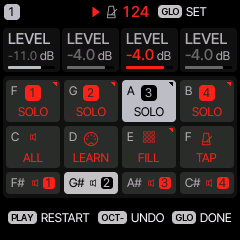
Hold GLO: black keys F#3-C#4 mute tracks 1-4, white keys F3-B3 solo while held, C4 unmutes all, D4 MIDI LEARN, E4 FILL while held (steps with the FILL condition play), F4 TAP tempo. K1-K4 are the track levels.
Tap GLO for SONG: up to 16 sections, each plays the project slots A-D on every track, with repeats.
Effects: what is what
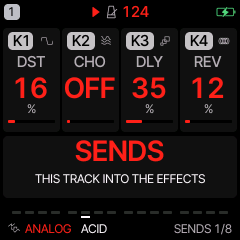
Tap FX again and again: the pages go round. The big line under the knobs says what the page does. Every value that turns an effect off reads OFF at zero.
| Page | What it is | Off |
|---|---|---|
| SENDS | how much of this track goes into distortion, chorus, delay and reverb (K1-K4) | a knob at OFF |
| SLICER | chops this track in time: GATE or STUTTER, in time with the tempo | K1 OFF |
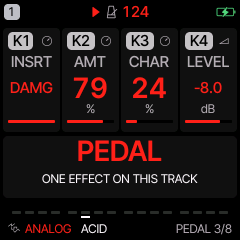
| PEDAL | one effect only on this track, like a pedal in front of an amp: SOFT, HARD, FOLD, FUZZ, CRUSH, PHASR, FLANG, CHOR, MUFF (fuzz pedal), BASS (bass amp drive), SMASH (heavy compression and clipping), DAMG (wear, see below) | K1 OFF |
| PEDAL MIX | how much of the pedal you hear, dry to wet | OFF |
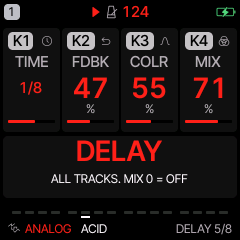
| DELAY | one delay shared by all tracks: TIME, FEEDBACK, COLOUR, MIX | MIX OFF (all tracks), or a track's DLY send |
| REVERB | one reverb for all tracks: ROOM, SPRING, HALL, size, damping | a track's REV send |
| CHORUS | one chorus for all tracks | a track's CHO send |
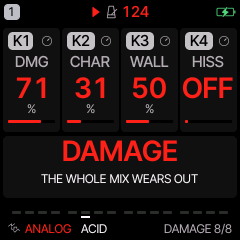
| DAMAGE | tape or digital degradation of the whole mix, WALL, HISS | DMG OFF, WALL OFF |
Delay, reverb and chorus are shared: a track gets them through its SENDS. That is why the delay "does not turn off" when you change the sound: the preset's sound has its own DLY send. Set DELAY > MIX to OFF to silence the delay for everyone, or SENDS > DLY to OFF for one track.
DAMAGE and WALL
The last FX page, four separate things:
- DMG (K1) degrades the whole mix: drive, then, as CHAR (K2) goes from tape to digital, a darker tone, the pitch wobbling and dips like a stretched tape, or lost bits, a dropped sample rate and hard cuts.
- WALL (K3) is one knob from quiet to wall, with no wear in it: it pushes every track's distortion and effect sends up, adds a heavily compressed copy of the mix under it and widens the stereo, and from 80 % on it plays the FILL steps. Turn it while playing: hold FX and turn SELECT.
- HISS (K4) is a tape's noise floor, on its own: it hisses while the tape runs, that is while PLAY plays, and when stopped while you play and for a second after. Stopped and silent: none. OFF: never.
From a controller: CC85 is WALL, CC86 DMG. The pedal DAMG does the same wear on one track (AMT, CHAR, LEVEL).
Saving and undo
- Undo: hold SAVE. Works for sound loads, tools, DICE, OOPS, clearing.
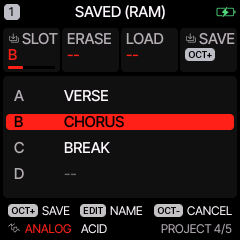
- A sound: stop, tap SAVE (USER), pick a slot with K1, OCT+, name it with the keys, OCT+. 32 slots.
- The music: SAVE > PROJECT: four projects, K4 saves, K3 loads, K2 erases.
- Patterns: SAVE > PHRASES loads ready-made patterns into the track.
- Autosave: turn the FM-1 off and on and the music is as you left it (MENU > RESTORE LAST).
MIDI and USB audio
- USB and TRS MIDI in: channels 1-4 play tracks 1-4 (MENU > MIDI > MIDI IN for other channels).
- The keys send MIDI out on the track's channel. Clock from internal, USB or TRS.
- CCs: 5 glide, 7 level, 10 pan, 71 resonance, 74 brightness, 72/73/75 release/attack/decay, 91/93/94 reverb, chorus, delay. GLCH: 74 cutoff, 71 resonance.
- MIDI LEARN: hold GLO, press D4, move a knob and a CC on your controller.
- USB audio: the FM-1 is a stereo audio input called KRIECHSTROM. Record it in any DAW, no driver. KRIECHSTROM ships with the USB serial console off, so macOS 13-15 sees the audio input right away.
Menu and screen
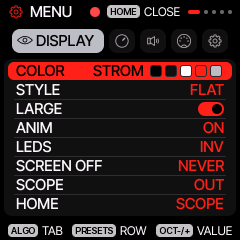
Hold HOME for the menu. ALGORITHM moves between the tabs, PRESETS through the rows, any knob changes the value, HOME closes it. KRIECHSTROM starts with the STROM palette (black and red), LARGE on (big values) and HELP on. For other colours: DISPLAY > COLOR.
All sounds
171 sounds. In brackets: the category for LIST on SAVE > PRESETS (K4).
ANALOG · 24
SAW LEAD (lead), SOFT PAD (pad), SQR BASS (bass), PWM STR (pad), ACID (bass), SINE KEY (keys), RAVE (lead), SUB BASS (bass), PLUCK (pluck), BRASS (lead), WIND (lead), STRINGS (pad), RUST SAW (bass), PISTON (bass), COLD SQUARE (bass), BLACK PULSE (bass), IRON LUNG (bass), SUB FLOOR (bass), HAMMER (bass), SEQUENCE (bass), SPINE (bass), SLOW BURN (bass), HOLLOW (pad), GUTTER (bass)
FM6 · 20
TINE EP (keys), BELL (pluck), FM BASS (bass), BRASS (lead), PAD (pad), MARIMBA (pluck), ORGAN (keys), PLUCK (pluck), BROKEN PIANO (keys), GLASS BELL (pluck), CHAPEL (keys), WIRE HARP (pluck), MERCY (keys), SHARDS (pluck), GRAVE BELL (pluck), RUSTED EP (keys), TOY PIANO (keys), MOURNING (pad), FERRIC (bass), NEEDLE (pluck)
PHASE · 16
BRASS (lead), ORGAN (keys), STRING (pad), RESO (lead), BELL (pluck), WIRE (pluck), SICK PAD (pad), ICE (pad), STATIC ANGEL (pad), COMA (pad), VAULT (pad), LAST LIGHT (pad), HYMN (pad), SCREAM LEAD (lead), RAZOR (lead), SIREN (pad)
LOFI · 5
PULSE LD (lead), WAVE BASS (bass), ARP 8BIT (lead), WAVE LEAD (lead), STEP LEAD (lead)
SAMPLE · 3
PIANO (keys), FLUTE (lead), SAX (lead)
VOICE · 4
CHOIR AAH (pad), VOX LEAD (lead), WOW BASS (bass), WHISPER (fx)
TRIO · 5
FAT BASS (bass), ARP LEAD (lead), SYNC LEAD (lead), RING BELL (pluck), CHIP CHOIR (pad)
GLCH · 48
DESTROYER (lead), FUZZ BASS (bass), BROKEN (fx), SCREAM (lead), NOIZ HIT (fx), HUM (bass), NASTY FM (lead), CRUSH LEAD (lead), SQR FUZZ (bass), FM BASS (bass), MELTDOWN (lead), RUST SAW (bass), REESE (bass), 808 DIST (bass), GRIT BASS (bass), GROWL (bass), ACID FUZZ (bass), OCTA SMASH (bass), GRINDER (bass), FILTH (bass), SCAR TISSUE (lead), DEAD WIRE (lead), BITROT (bass), BREAKER (bass), FAULT LINE (lead), FUZZ GUT (bass), VOLTAGE (lead), NERVE (pluck), WIRE BRUSH (fx), SPLINTER (fx), BLOODLINE (bass), SICK ENGINE (bass), RUST BELT (bass), CONCRETE (bass), STATIC LEAD (lead), HOWLER (lead), BURN UNIT (lead), CAUTERIZE (pluck), STUTTER BASS (bass), FRACTAL (fx), HUSHED FUZZ (pad), WARHEAD (bass), SCREWDRIVER (lead), CORRODED PAD (pad), TERMINAL HUM (pad), BROKEN RADIO (fx), SPIKE (pluck), MACHINE GUN (fx)
GRAIN · 4
CLOUD PAD (pad), GLITCH (fx), FROZEN (pad), SHIMMER (pad)
PHYS · 9
BELL TREE (pluck), MARIMBA (pluck), PLUCK (pluck), BOWED METAL (pad), KALIMBA (pluck), HAND DRUM (drum), TOMS (drum), DRONE STRING (pad), HARP (pluck)
DRUM · 13
DRUM KIT (drum), DEEP KIT (drum), TIGHT KIT (drum), PERC KIT (drum), DESTROY (drum), FACTORY (drum), STOMP (drum), GATED (drum), BUNKER (drum), TOMB (drum), RIOT (drum), METAL SHOP (drum), DRY BONES (drum)
NOISE · 18
WIND (fx), RAIN (fx), ARCADE (fx), METAL (fx), STATIC (fx), TV DEATH (fx), CRACKLE (fx), FEEDBACK (fx), VACUUM (fx), RISER (fx), GEIGER (fx), RADIO GHOST (fx), GENERATOR (fx), RUST WIND (fx), EARTHQUAKE (fx), DEAD AIR (fx), ALARM (fx), SHOCK (fx)
SLICE · 2
CHOP (drum), STUTTER (drum)
Credits and source
KRIECHSTROM is free software under the GNU GPL 3.0. It is a fork of Felucca by Leo Kuroshita, Hügelton Instruments (GPL-3.0, its engines MIT). Parts of Glitchbox by erikdevos: the GLCH engine, the DESTROY kit, the MUFF / BASS / SMASH inserts, ROLL and GATE. Ideas from DIRGE by sinscum. The source of this exact build is on the home page.